TL;DR Summary of Transitioning from Fitbit to Google Health: Challenges and Alternative Apps
Optimixed’s Overview: Navigating the Fitbit to Google Health Shift and Exploring Top Fitness App Alternatives
Impact of Fitbit’s Transition to Google Health on User Experience
The overnight conversion of the Fitbit app into Google Health has caused significant disruption for longtime users accustomed to Fitbit’s comprehensive features. The transition removed or altered many core tools that supported effective calorie tracking, weight management, and food logging, which affected users’ motivation and data accuracy.
Key Limitations Noted in Google Health
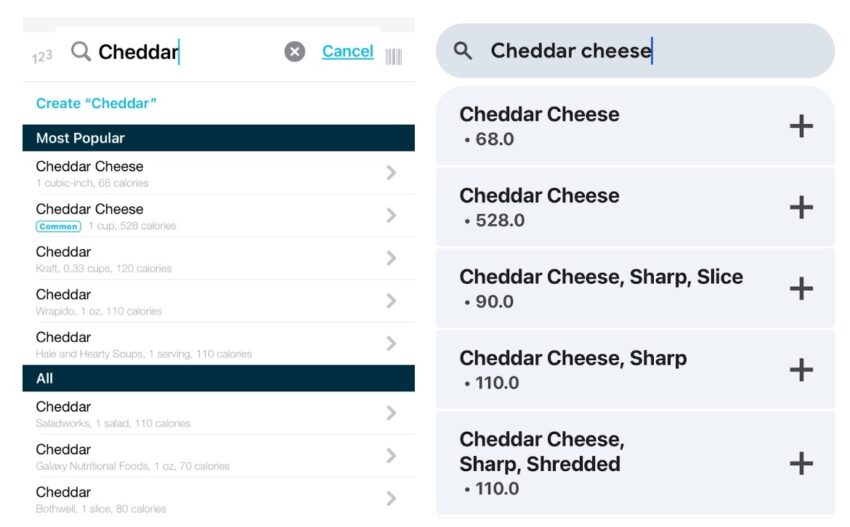
- Portion Size and Unit Visibility: Unlike Fitbit, Google Health’s food search results do not display portion sizes or units upfront, making it harder to estimate calorie intake accurately.
- Inability to Change Food Units: Users cannot switch between measurement units (e.g., cups to grams), limiting flexibility.
- Complex Deletion Process: Removing logged food or weight entries requires multiple steps, reducing usability.
- Loss of Custom Food Items: Custom entries and categorized food lists have disappeared, requiring users to re-enter frequent meals manually.
- Weight Goal Guidance Removed: The helpful guided weight goal setup and calorie limit recommendations are absent, forcing users to set goals without structured support.
- Obstructive In-App Confirmations: Persistent confirmation messages interfere with smooth navigation.
- Combined Snack Category: All snacks are lumped into one category, disrupting chronological food tracking.
- Separate Weight and Body Fat Logging: Users must log these metrics individually, adding to effort.
Exploring Alternative Apps Compatible with Fitbit Data
For those seeking replacements or supplements to Google Health, several apps provide strong Fitbit integration and improved usability:
- MyFitnessPal: Offers an extensive food database, syncs Fitbit calorie burn effectively, and provides clear under/over consumption feedback. Premium features enable calorie goal adjustments based on activity.
- Lose It: Provides Fitbit syncing with a dedicated calorie widget and intuitive calorie bonus tracking. Premium subscription required for full integration.
- MyNetDiary: Integrates Fitbit data to calculate exercise-related calorie bonuses and supports detailed nutrition tracking.
- Cronometer: Valued for its energy summary dashboard but lacks calorie visibility in food search results, reducing ease of use.
Looking Ahead
While Google Health introduces some positive changes, users heavily reliant on Fitbit’s detailed tracking features face challenges. The current alternatives show promise but may require premium subscriptions for full functionality. The ideal outcome would be a Google Health update that restores the critical features Fitbit users depend on, ensuring a smooth, all-in-one health tracking experience without needing to switch apps.



