TL;DR Summary of YouTube’s Enhanced Shorts Editor Unlocks Advanced Multi-Track Editing
Optimixed’s Overview: How YouTube’s New Shorts Editor Elevates Video Creation with Multi-Track Precision and AI Integration
Enhanced Editing Experience Within YouTube
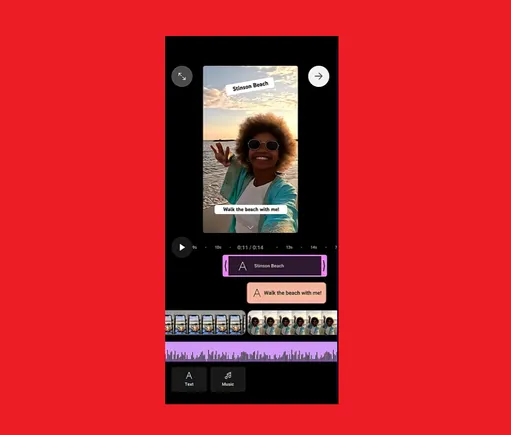
YouTube is rolling out a revamped Shorts editor designed to provide creators with greater control over their content. By separating projects into distinct audio and video tracks, users can now make specific changes more efficiently without juggling multiple apps.
Key Features of the Updated Shorts Editor
- Multi-track layout: Video clips, overlays, and audio are visible in one timeline for streamlined editing.
- Drag-and-drop functionality: Easily trim, reorder, and adjust clips with intuitive controls.
- Zoom for precision: Fine-tune edits with the ability to zoom into timelines.
- Built-in integration: All tools are accessible directly within the Shorts composer flow inside the YouTube app.
Future Improvements and AI-Powered Creativity
YouTube plans to introduce additional enhancements such as slip editing, clip splitting, and direct media addition from the timeline. Moreover, AI tools like the recently launched “Extend with AI” feature aim to empower creators by simplifying complex edits and expanding creative possibilities.
While AI editing is still evolving, YouTube’s vision is to provide more creative freedom with less friction, enabling creators to craft engaging Shorts content more efficiently.
Conclusion
The updated Shorts editor marks a significant step forward for YouTube creators, combining familiar multi-track editing capabilities with innovative AI assistance—all within the native app environment. This development promises to enhance the Shorts creation workflow and inspire more dynamic video content.



