TL;DR Summary of YouTube Updates Mobile Video Management and Upload Flow for Creators
Optimixed’s Overview: Enhancing Creator Experience with YouTube’s Streamlined Mobile Tools
Key Improvements to Video Management and Upload Process
YouTube is rolling out updates focused on improving the creator experience on mobile devices by simplifying how videos are managed and uploaded. The main highlights include:
- Consolidated Video List Access: YouTube has removed the “Manage videos” option, making “Your videos” the primary and sole entry point for accessing the video list on the mobile channel page. This reduces confusion by limiting navigation choices.
- Redirect After Upload: Once a video is uploaded, creators are redirected directly to their channel page where all content management (videos, Shorts, live streams) occurs via tabs, streamlining the workflow.
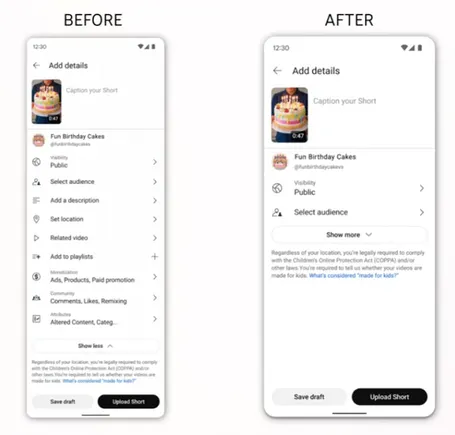
- Updated Video Settings Interface: The upload screen now hides expanded settings behind a “Show more” dropdown menu, presenting a cleaner, less cluttered interface by default.
Impact on Creators and Content Uploads
These design tweaks aim to make managing content more intuitive on mobile, especially benefiting those focusing on Shorts. While the simplified settings screen encourages faster uploads, creators are advised to still consider adding detailed metadata to ensure better content visibility and categorization. Notably, creators participating in YouTube’s shopping program will continue to see product tag fields prominently displayed during upload.
Overall, these updates could lead to increased content uploads and a smoother management experience without sacrificing essential functionality, positioning YouTube to better support its growing community of mobile creators.



